How do you do an ASO keyword refresh before a seasonal peak?
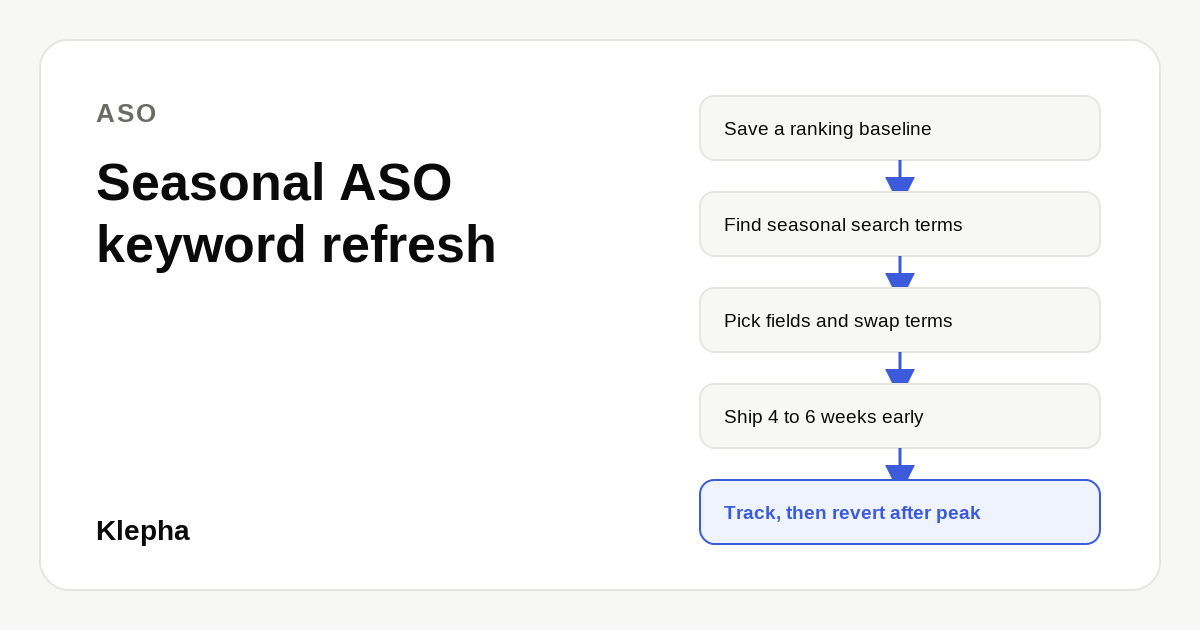
An ASO keyword refresh before a seasonal peak means finding the search terms that grow in that season, swapping them into the metadata fields that affect search four to six weeks ahead, and tracking ranking changes against a saved baseline. On the App Store most keyword fields change only with a new app version, so the timing has to allow for review and indexing.
App store search changes with the calendar. Fitness apps see new year resolutions, budgeting apps see tax season, shopping and gifting apps see November and December, and education apps see back to school. If your metadata only targets your evergreen terms, you miss the weeks when the most people are searching for what you offer.
This guide walks through a seasonal keyword refresh for both the App Store and Google Play: finding new terms, deciding which fields to change, timing the update, and tracking what happened. Field limits follow Apple and Google documentation cited on November 18, 2026. For the basics of choosing keywords, start with our guide to App Store title and subtitle keywords.
Key takeaways
- Start four to six weeks before the peak. App Store keyword, name and subtitle changes need a new version and review, and rankings take time to settle.
- Save a baseline first. Record current rankings, impressions and conversion rate for your main terms so you can judge the change.
- Swap, do not just add. The App Store keyword field has 100 characters. Seasonal terms replace your weakest evergreen terms for a while.
- Use the fields that change without a release. Promotional text and in-app events on the App Store, and promotional content on Google Play, carry seasonal messages without touching core keywords.
- Plan the revert. Put the post-season update in the calendar so seasonal terms do not sit in your metadata for months after demand has gone.
What is a seasonal ASO keyword refresh?
App store optimization (ASO) is the work of improving how an app ranks in app store search and how many people install it after seeing the listing. A seasonal keyword refresh is a time-limited version of that work: you adjust your metadata so the app ranks for searches that rise during a predictable period, then adjust it back when the period ends.
It is different from a full ASO audit. An audit looks at everything, from screenshots to ratings. A refresh is narrow: which terms, in which fields, shipped when, and measured how. Done well it is a few days of work spread across six to eight weeks.
Which seasons matter for which kinds of app?
Not every app has a holiday peak. Map your own calendar before doing any keyword work, using last year's store analytics to confirm when installs actually rose:
| App category | Typical seasonal moments | Example seasonal modifiers |
|---|---|---|
| Shopping, deals and gifting | Black Friday, Cyber Monday, December holidays | gift, deals, wishlist, christmas |
| Health and fitness | New year, early summer | new year, challenge, home workout |
| Finance and budgeting | New year, tax season, holiday spending | budget, tax, holiday spending |
| Education and productivity | Back to school, new year | homework, study planner, school |
| Travel | Summer and winter holiday booking windows | holiday trip, packing list, flights |
These are examples, not data: the right modifiers are the ones your own users search, which the research step below helps you find. Many apps have two or three peaks a year, and each deserves its own small refresh.
Which metadata fields can you change, and how quickly?
The two stores index different fields and let you change them on different schedules. That difference decides your timeline.
| Store | Field | Limit | Affects search? | Needs a new app version? |
|---|---|---|---|---|
| App Store | App name | 30 characters | Yes, strongly | Yes |
| App Store | Subtitle | 30 characters | Yes | Yes |
| App Store | Keyword field | 100 characters | Yes | Yes |
| App Store | Promotional text | 170 characters | Not used for search ranking, per Apple | No, can be updated any time |
| App Store | In-app events | Event name and descriptions | Events can appear in search results | No, submitted separately for review |
| Google Play | App name | 30 characters | Yes | No, store listing changes are reviewed separately |
| Google Play | Short description | 80 characters | Yes | No |
| Google Play | Full description | 4,000 characters | Yes, Play reads the text | No |
The key point: on the App Store, the name, subtitle and keyword field only change when you submit a new version of the app. You need a build ready, time for review, and time for the new metadata to be indexed and for rankings to settle. Google Play has no keyword field; it reads your title and descriptions, and store listing edits go through their own review without an app release.
Both stores have rules about metadata. Apple rejects keyword stuffing, competitor names and irrelevant terms, and Google Play's metadata policy bans misleading or repetitive keywords and unattributed testimonials. Seasonal terms must describe something the app actually offers during that season.
When should you start the refresh?
Work back from the date demand starts to climb, not from the peak itself. A practical timeline for a peak that begins in late November:
| Weeks before demand rises | Task |
|---|---|
| 8 weeks | Save the ranking baseline; pull last year's search and install data |
| 6 to 7 weeks | Research seasonal terms; draft new keyword field, subtitle and Play descriptions |
| 5 weeks | Submit the app version with new App Store metadata; publish Google Play listing changes |
| 3 to 4 weeks | Check indexing and early rankings; submit in-app events; prepare promotional text |
| Peak | Update promotional text and promotional content; monitor rankings and conversion daily |
| After peak | Ship the revert version; compare against the baseline |
If your team only ships app versions every few weeks, align the metadata change with a planned release rather than forcing an extra one. If it is already too late for the main fields this year, use promotional text, in-app events and Google Play listing edits, which can still move quickly.
Do AI assistants recommend your app when people ask for one?
A free Klepha report shows whether ChatGPT, Gemini and Perplexity name your app for the questions your users ask, alongside how your site performs in search.
Get my free reportHow do you build a baseline before changing anything?
Without a baseline you cannot tell whether a change helped. Record, for each store:
- Rankings for 20 to 50 tracked terms: your main evergreen terms plus the seasonal candidates. Use an ASO tool or manual checks on a clean device in each target country.
- Search impressions and product page views from App Store Connect analytics, and store listing acquisition data from the Google Play Console.
- Conversion rate from page view to install, by source if you can.
- Last year's seasonal data, so you compare like with like. A spike in December may be normal for your category regardless of any change.
Save the current text of every field too. You will need it for the revert.
How do you find new seasonal keyword ideas?
Look for terms that rise in the season and that your app genuinely serves. Good sources:
- Store search suggestions. Type your core terms and seasonal modifiers into each store's search box and note the autocomplete suggestions: "gift", "holiday", "christmas", "new year", "planner", "budget", "workout", depending on your category.
- Apple Ads search popularity. Apple Ads keyword recommendations show a popularity indicator for App Store searches, a useful relative signal even if you do not run ads.
- Last season's data. App Store Connect and Google Play Console show which search terms drove installs in previous seasons.
- Web search trends. Google Trends shows when seasonal interest starts rising, which helps with timing even though web and app store searches differ.
- Competitors. Check which seasonal words competitors added to their names and subtitles last year, and which apps rank for the seasonal terms you want.
- Your own reviews and support messages. Users describe seasonal use cases in their own words.
Score each candidate on three things: relevance to what the app does in that season, search popularity, and how strong the apps currently ranking for it are. A relevant term with moderate popularity and beatable competition usually beats a huge, generic term you cannot rank for. Our guide on long tail keywords covers the same trade-off on the web.
How do you update the metadata without losing core rankings?
The risk in a seasonal refresh is that you push out terms that bring steady installs all year. Protect them:
- Leave your top evergreen terms where they are. If one term in the name drives most of your search installs, do not swap it for a seasonal word.
- Swap the weakest terms in the keyword field. Remove terms where you rank poorly or that bring few impressions, and add the seasonal ones in their place.
- Do not repeat words across fields on the App Store. Apple combines words from the name, subtitle and keyword field, so repeating a word wastes characters.
- Consider the subtitle for the strongest seasonal term if it is highly relevant, because the subtitle is also visible to users and can lift conversion as well as rankings.
- On Google Play, write naturally. Work the seasonal terms into the short description and the first lines of the full description in normal sentences, not lists of keywords.
- Match the visuals. A seasonal first screenshot or caption helps conversion when people arrive from a seasonal search. See our guide to screenshot captions that convert.
Apple's product page optimization lets you test icons, screenshots and previews, but not the name, subtitle or keywords. Google Play store listing experiments can test text such as descriptions. Use them for the parts they cover, and judge keyword changes with the before and after comparison.
How do you track ranking changes after the update?
Check the tracked terms every few days for the first two weeks after the update goes live, then weekly through the season. Expect some movement in the first days while the store re-indexes. Look at three layers:
| Layer | Question | Where to look |
|---|---|---|
| Rankings | Did the app start ranking for the seasonal terms, and did core terms hold? | ASO tool or manual checks per country |
| Visibility | Did search impressions and product page views rise? | App Store Connect, Google Play Console |
| Outcome | Did installs from search and the conversion rate improve, compared with last season? | Store analytics, your attribution tool |
If a core term drops sharply and does not recover within a couple of weeks, consider restoring it in the next version. If a seasonal term brings impressions but poor conversion, the listing may not match what those searchers want.
What should you do after the seasonal peak?
- Ship the revert in the first version after the season, restoring evergreen terms or moving straight to the next season's set.
- Update promotional text and events so nothing on the listing refers to an offer that has ended.
- Write down results per term: ranking reached, impressions, installs and conversion. Next year's refresh starts from this list.
- Reply to seasonal reviews. Peaks bring new users and new complaints. Our guide on responding to negative app reviews has templates.
App visibility is increasingly shaped outside the stores too, as people ask AI assistants which app to use. Our comparison of SEO, GEO and ASO explains how the three fit together, and our expertise page and case studies show how we approach them.
Sources
- Apple Developer, "Creating your product page", for name, subtitle, keyword field and promotional text guidance, cited November 18, 2026. developer.apple.com
- Apple Developer, "In-app events", cited November 18, 2026. developer.apple.com
- Apple Developer, "Product page optimization", cited November 18, 2026. developer.apple.com
- Apple Ads, "Recommendations: Best Practices", for the search popularity indicator, cited November 18, 2026. ads.apple.com
- Play Console Help, "Metadata" policy, cited November 18, 2026. support.google.com
Frequently asked questions
How early should I update app keywords for a seasonal peak?
Start four to six weeks before demand begins to rise. On the App Store the name, subtitle and keyword field change only with a new app version, which needs review, and rankings take time to settle after the store re-indexes the metadata.
Can I change App Store keywords without releasing a new version?
No. The app name, subtitle and keyword field are updated when you submit a new version. Promotional text can be changed at any time without a release, but Apple does not use it for search ranking.
Does Google Play have a keyword field?
No. Google Play reads the app title, short description and full description. Work seasonal terms naturally into those texts, and avoid repetitive keyword lists, which Google Play metadata policy does not allow.
Will adding seasonal keywords hurt my existing rankings?
It can if you remove terms that drive steady installs. Keep your strongest evergreen terms, swap out the weakest ones, save a baseline before the change, and restore any core term that drops and does not recover.
What should I do with seasonal keywords after the peak?
Remove them in the first app version after the season and restore your evergreen terms or move to the next seasonal set. Record the results for each term so the next refresh starts from real data.